Setup dashboard · Step 2 of 5

Picking "Telehealth video call" gives you "Other"

A new signup lands on the locations step, opens the dropdown, clicks Telehealth video call, and the field changes to Other. Nothing is technically broken, but it reads as a bug and it leaves the account with two near-identical video locations. Here is what is happening and four cheap ways to fix it.

What the user sees

Carlos's own screenshots from a fresh account, in order.

Hover or tap a numbered marker to see what is wrong at that spot
STEP 1You land on an empty form

The step opens on the "Add location" tab with nothing filled in.
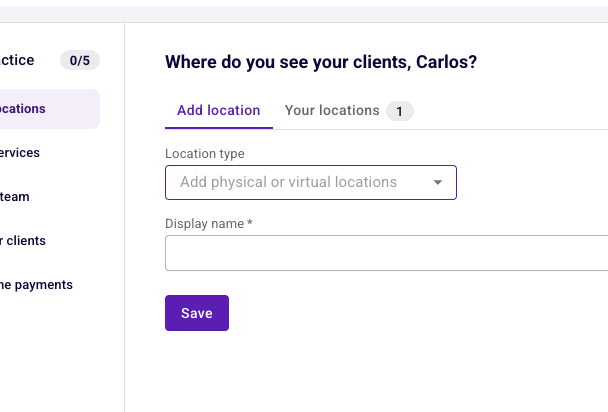
Locations step on landing: Add location tab active with an empty Location type dropdown
STEP 2You open the dropdown and pick telehealth

Five options. For anyone running video appointments, one of them is the obvious match.
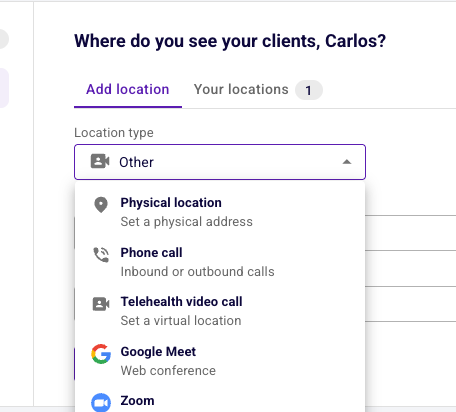
Location type dropdown open showing Physical location, Phone call, Telehealth video call, Google Meet and Zoom
STEP 3The field says something else

This is the moment the flow loses trust.
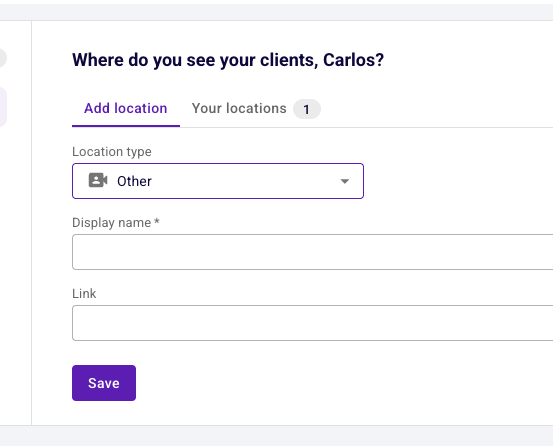
After selecting Telehealth video call the Location type field displays Other
STEP 4You end up with two video locations

The duplicate only becomes visible after saving, on a tab the user had not opened.
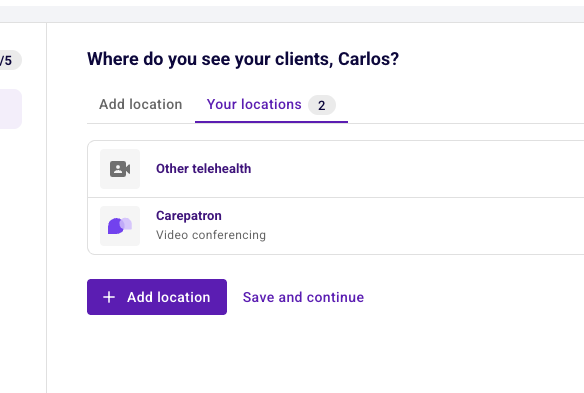
Your locations list showing Other telehealth and Carepatron Video conferencing

The root cause is hidden state, not a broken dropdown

Every new account gets a Carepatron telehealth location created for it automatically. That location occupies the built-in telehealth type, so when a user picks "Telehealth video call" the form has to fall back to the generic type, and the UI shows that fallback name instead of the label that was clicked.

1Signup auto-creates a Carepatron telehealth location.
2The step opens on an empty form, so that location is invisible.
3The user picks telehealth, and the type is taken, so it resolves to Other.
4The UI shows the internal type name, which reads as a failed click.
5They save anyway and get a duplicate video location.

Fixing the type collision properly is an engineering job. Everything below works around it instead, and steps 2 and 4 of that chain are cheap to break.

Four cheap fixes, and one worth doing

All of these start from the current design. None of them change the auto-add behavior or the data model.

A
Show the label that was clicked
The dropdown still maps telehealth to the Other type underneath, but the field displays what the user selected. Kills the failed-click moment. Does not stop the duplicate.
Front-end only~1 line
B
Rename the option to "Other telehealth"
The saved location is already called "Other telehealth" in the list, so the dropdown should say the same. Subtitle becomes "Zoom, Teams, Doxy.me or another platform". Now the option, the field and the saved row all agree.
Copy change2 strings
C
Remove the option entirely
Carepatron video is auto-added and Meet and Zoom cover the common alternatives. Cheapest of all, but it strands anyone on Teams or Doxy.me, so it needs a catch-all first. Not recommended on its own.
Has a gap1 list entry
D
Open on "Your locations" instead of the form
Land on the list with the Carepatron location visible and badged, plus one line explaining that video calls are built in. Most people then never open the dropdown looking for telehealth.
One conditionalDefault tab + hint
Recommended: B + D together
Show the location that already exists, and rename the one confusing option so nothing contradicts itself. B stops the field from lying; D stops the duplicate being created in the first place. A default tab, a hint line and two copy strings.
Half a dayNo data-model change
Worth saying out loud: none of these change the fact that every account gets an auto-added location occupying the built-in telehealth type. That collision is the real cause and it stays. These are workarounds chosen for cost, and they are honest ones, but do not brief them as having fixed the underlying behavior.